





ಕಾಲ್ ಆಫ್ ಡ್ಯೂಟಿ ಬ್ಲ್ಯಾಕ್ ಓಪ್ಸ್ ಕೋಲ್ಡ್ ವಾರ್ ಜೋಂಬಿಸ್ ಡೌನ್ಲೋಡ್ - ಆಂಡ್ರಾಯ್ಡ್ ಕ್ಲೌಡ್ ಗೇಮಿಂಗ್ ಅಪ್ಲಿಕೇಶನ್ - ಚಿಕಿ
Download Call of Duty: Black Ops Cold War zombies using Chikii Cloud Gaming, Chikii Is cloud gaming available for Android, chikii is not available for iOS yet. Chikii is a mobile game APP android for PC and console games, as a cloud gaming platform with over 400+ and 200+ 3A games, in Steam, PS4, Xbox One, and Switch game libraries, all you need is a mobile Android phone to play your favorite PC games and console. can we play Call of Duty: Black Ops Cold War zombies on Android? Yes, you can play Call of Duty: Black Ops Cold War zombies on Android using the Chikii app cloud gaming, and you just need a good internet speed, let me tell you some information about Call of Duty: Black Ops Cold War zombies: Call of Duty: Black Ops Cold War campaign allows players to assume a custom character, codenamed “Bell”, with the ability to choose their intelligence agency, skin tone, nationality, and gender; as well as different personality traits that provide in-game perks. For the first time since Call of Duty: Black Ops II, the campaign features multiple endings, dependent on player choice throughout the campaign. Zombies features a new storyline titled “Dark Aether” which expands on the original Aether story, concluded in Black Ops 4, while also staying true to the main narrative of the campaign. Instead of playing as predefined characters, players can take on the role of Operator characters from Multiplayer, as part of a CIA response team codenamed “Requiem”. Progression from Multiplayer is shared with Zombies, as players are able to use any weapon to start a Zombies match, alongside Gunsmith, scorestreaks and field upgrades, in addition to returning mechanics such as wallbuys, the Mystery Box, Pack-a-Punch and past fan-favorite Perks. For the first time in Zombies, players can opt to “exfil” the map, which will put them in a difficult wave with increased enemy spawn that they must survive before they can escape. Collectible intels are also scattered around the playable maps, allowing players to keep track of and unfold the main story as they progress.[8] A skill upgrade system is featured in the game, allowing players to enhance weapons, perks, ammo mods and field upgrades with Aetherium Crystals, a currency acquired from reaching round milestones. A new game mode, Onslaught, was introduced exclusively to PlayStation players until November 1, 2021. In this mode, which are played within Multiplayer maps, up to 2 players defend areas grounded off by the Dark Aether orb, which must be powered by zombie kills. Sufficient kills will move the orb to new positions, forcing the players to move or die outside of the orb’s protection zone.[9] The Season Two update introduces “Outbreak”, a large-scale mode where players fight off zombie hordes and complete objectives in an open-world area, composed of locations featured in the larger Multiplayer modes. and you can find more information on WIಕಿಪೀಡಿಯಾ ಈಗ ಕಾಲ್ ಆಫ್ ಡ್ಯೂಟಿ ಪ್ಲೇ ಮಾಡಲು ಪ್ರಾರಂಭಿಸೋಣ: ಆಂಡ್ರಾಯ್ಡ್ನಲ್ಲಿ ಬ್ಲ್ಯಾಕ್ ಓಪ್ಸ್ ಶೀತಲ ಸಮರದ ಸೋಮಾರಿಗಳು ಚಿಕಿ ಕ್ಲೌಡ್ ಗೇಮ್ ಅಪ್ಲಿಕೇಶನ್ ಅನ್ನು ಬಳಸುತ್ತಾರೆ:
ನಾವು ಪ್ರಾರಂಭಿಸುವ ಮೊದಲು ನಾನು ಅಮೆಜಾನ್ನಲ್ಲಿ ಲಭ್ಯವಿರುವ ಈ ಪರಿಕರಗಳನ್ನು ಹೆಚ್ಚು ಆರಾಮದಾಯಕವಾಗಿ ಆಡಲು ಮತ್ತು "ಕೆಟ್ಟದ್ದಲ್ಲ" ಆಟದೊಂದಿಗೆ ಉತ್ತಮ ಸಮಯವನ್ನು ಪಡೆಯಲು ಶಿಫಾರಸು ಮಾಡುತ್ತೇವೆ:
Null48 ಗೇಮಿಂಗ್ ಪ್ಯಾಕ್ ಮಾಡಿ: ನಾನು ASUS RT-BE96U BE19000 802.11BE ಟ್ರೈ-ಬ್ಯಾಂಡ್ + ಬ್ಲಾಕ್ ಶಾರ್ಕ್ ಫೋನ್ ಫನ್ಕೂಲರ್ 3Pro ಅನ್ನು ಶಿಫಾರಸು ಮಾಡುತ್ತೇನೆ. ನಿಮ್ಮ ಫೋನ್ ಮ್ಯಾಗ್ನೆಟಿಕ್ ಅನ್ನು ಬೆಂಬಲಿಸಿದರೆ ಬ್ಲ್ಯಾಕ್ ಶಾರ್ಕ್ ಮ್ಯಾಗ್ನೆಟಿಕ್ 3Pro ಫೋನ್ ಕೂಲರ್ + ಬ್ಲಾಕ್ ಶಾರ್ಕ್ ಬ್ಲೂಟೂತ್ ಇಯರ್ಬಡ್ಗಳನ್ನು ಖರೀದಿಸಿ . ಆದರೆ ನಿಮ್ಮ ಫೋನ್ 3.5mm ಜ್ಯಾಕ್ ಅನ್ನು ಬೆಂಬಲಿಸಿದರೆ ಇಯರ್ಬಡ್ಗಳಿಗಿಂತ ಉತ್ತಮವಾದ ಹೆಡ್ಸೆಟ್ ಅನ್ನು ಖರೀದಿಸಿ. MOMOFLY ಗೇಮಿಂಗ್ ಫಿಂಗರ್ ಸ್ಲೀವ್ಗಳು. ಆಟಗಳೊಂದಿಗೆ ನೀವು ಅದ್ಭುತ ಸಮಯವನ್ನು ಪಡೆಯುತ್ತೀರಿ ಎಂದು ನಾನು ಖಾತರಿಪಡಿಸಬಲ್ಲೆ.
Null48 ಗೇಮಿಂಗ್+ ಪ್ಯಾಕ್ ಮಾಡಿ: ಇಲ್ಲಿ ಮತ್ತೊಂದು ಹಂತದ ಗೇಮಿಂಗ್ ಇದೆ, ನಾನು ಗೇಮಿಂಗ್ ರೂಟರ್ ASUS ROG Rapture GT-AXE16000 + Asus AeroActive Phone Cooler 6 + ASUS ROG Delta S ವೈರ್ಲೆಸ್ ಹೆಡ್ಸೆಟ್ + ಅಥವಾ ಅದೇ ಆವೃತ್ತಿಯನ್ನು ಶಿಫಾರಸು ಮಾಡುತ್ತೇನೆ ಆದರೆ USB-C ಕೇಬಲ್ನೊಂದಿಗೆ ASUS ROG Delta S ಹೆಡ್ಸೆಟ್ + MGC ClawSocks ಜಿಯೋ ಕ್ಯಾಮೊ
1000% ಗ್ಯಾರಂಟಿ ಗೇಮಿಂಗ್ "ಪ್ಯೂರ್ ಗೇಮಿಂಗ್ ಫೀಲಿಂಗ್" ಜೊತೆಗೆ ಅದ್ಭುತವಾದ ಉತ್ತಮ ಸಮಯ
#ಎಡಿ
ಕಾಲ್ ಆಫ್ ಡ್ಯೂಟಿ: ಬ್ಲ್ಯಾಕ್ ಓಪ್ಸ್ ಶೀತಲ ಸಮರದ ಸೋಮಾರಿಗಳ ಆಂಡ್ರಾಯ್ಡ್ ಗೇಮ್ಪ್ಲೇ
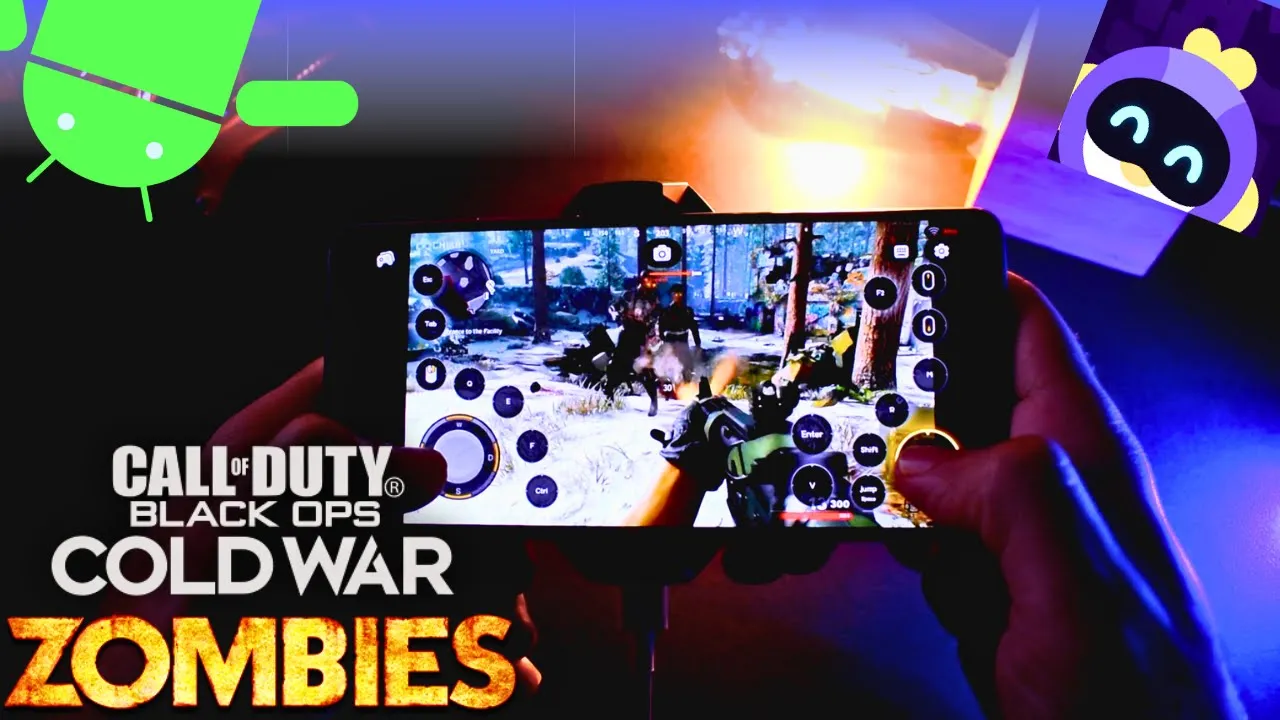
ಈಗ ಕಾಲ್ ಆಫ್ ಡ್ಯೂಟಿ ಪ್ಲೇ ಮಾಡಲು ಈ ಹಂತಗಳನ್ನು ಅನುಸರಿಸಿ: Chikii ಕ್ಲೌಡ್ ಗೇಮಿಂಗ್ ಅಪ್ಲಿಕೇಶನ್ ಬಳಸಿಕೊಂಡು Android ನಲ್ಲಿ ಬ್ಲ್ಯಾಕ್ ಓಪ್ಸ್ ಶೀತಲ ಸಮರದ ಸೋಮಾರಿಗಳನ್ನು:
ಹಂತ 1- ನೀವು Chikii ಅಪ್ಲಿಕೇಶನ್ ಅನ್ನು ಡೌನ್ಲೋಡ್ ಮಾಡಿಕೊಳ್ಳಬೇಕು ಮತ್ತು ಸ್ಥಾಪಿಸಬೇಕು:
ಗಮನಿಸಿ: Chikii ಅಪ್ಲಿಕೇಶನ್ ಕೆಲವು ದೇಶಗಳಿಗೆ ಇನ್ನೂ ಲಭ್ಯವಿಲ್ಲ, ಬಹುಶಃ ನೀವು ಅದನ್ನು Google Play ನಲ್ಲಿ ಹುಡುಕಲು ಸಾಧ್ಯವಿಲ್ಲ, ಇದನ್ನು ನೇರವಾಗಿ ಡೌನ್ಲೋಡ್ ಮಾಡಿ ಇದು Google Play ನಲ್ಲಿ ಅದೇ ಆವೃತ್ತಿಯಾಗಿದೆ.
ನೀವು ಅದನ್ನು ಡೌನ್ಲೋಡ್ ಮಾಡಿದ ನಂತರ Chikii ಅಪ್ಲಿಕೇಶನ್ ಅನ್ನು ಪ್ರಾರಂಭಿಸಲು ಈ ಚಿತ್ರಗಳನ್ನು ಅನುಸರಿಸಿ:
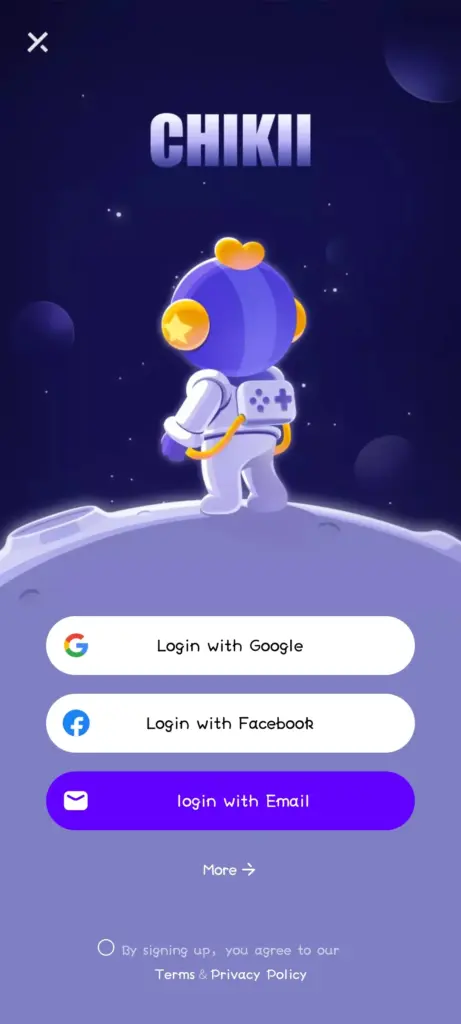
ಹಂತ 2 - ನೀವು Chikii ಅಪ್ಲಿಕೇಶನ್ ಅನ್ನು ಸ್ಥಾಪಿಸಿದ ನಂತರ, ಅದನ್ನು ತೆರೆಯಿರಿ ನಂತರ ನಿಮ್ಮ ಲಾಗಿನ್ ಪ್ರಕಾರವನ್ನು ಆಯ್ಕೆಮಾಡಿ (Google Gmail, Facebook, ಅಥವಾ Yahoo, Outlook, ಇತ್ಯಾದಿಗಳಂತಹ ಸಾಮಾನ್ಯ ಇಮೇಲ್ನೊಂದಿಗೆ...)
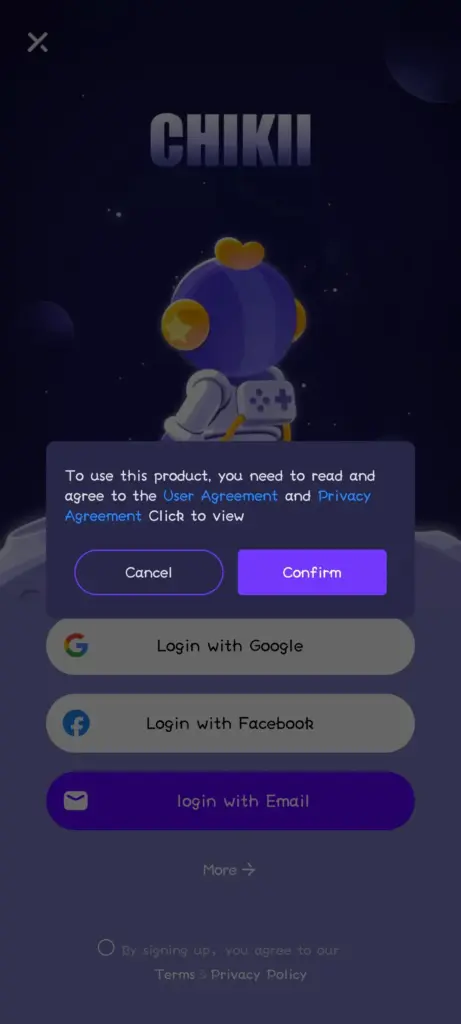
ಹಂತ 3 - ಬಳಕೆದಾರ ಮತ್ತು ಗೌಪ್ಯತೆ ಒಪ್ಪಂದದ ಬಗ್ಗೆ ದೃಢೀಕರಿಸಲು Chikii ಅಪ್ಲಿಕೇಶನ್ ನಿಮ್ಮನ್ನು ಕೇಳುತ್ತದೆ, "ದೃಢೀಕರಿಸಿ" ಕ್ಲಿಕ್ ಮಾಡಿ
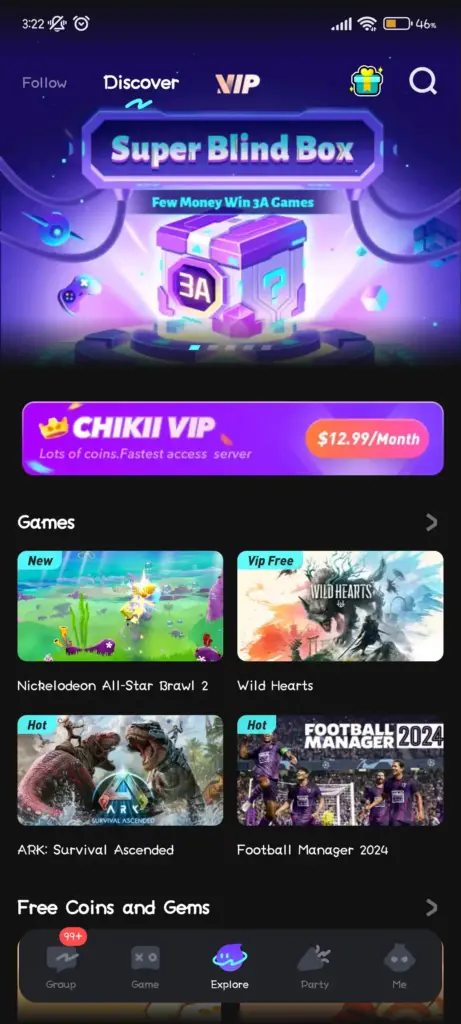
ಹಂತ 4 - ನೀವು ಲಾಗ್ ಇನ್ ಮಾಡಿದ ನಂತರ ನೀವು ಎಕ್ಸ್ಪ್ಲೋರ್ ಹೋಮ್ ಚಿಕಿ ಆ್ಯಪ್ ಪುಟದಲ್ಲಿ ನಿಮ್ಮನ್ನು ಕಾಣುವಿರಿ, ನೀವು ಕೊನೆಯ ಹೊಸ ಆಟಗಳು ಅಥವಾ ಕೊನೆಯ ಹಾಟ್ ಗೇಮ್ಗಳನ್ನು ಕಾಣಬಹುದು...
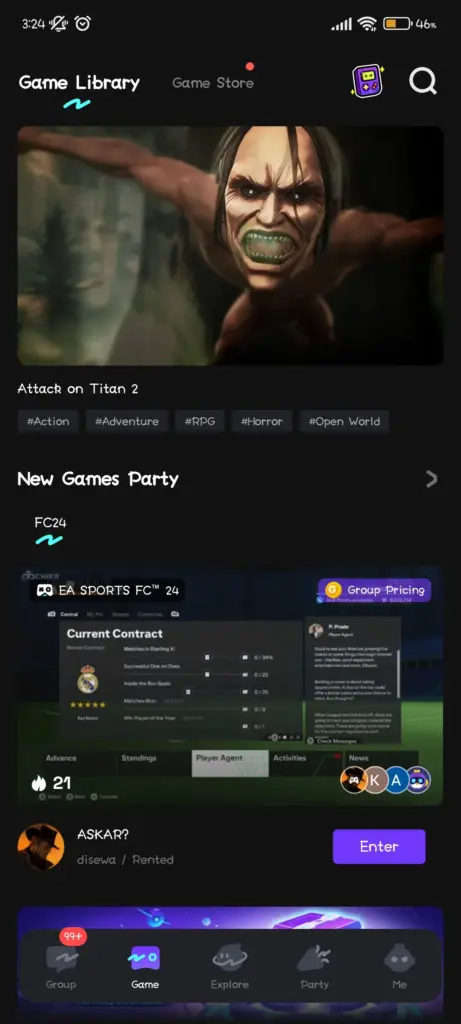
ಹಂತ 5 - ಎಕ್ಸ್ಪ್ಲೋರ್ ಪುಟವನ್ನು ಆಟದ ಪುಟಕ್ಕೆ ಸ್ವೈಪ್ ಮಾಡಿ ಮತ್ತು ಕೆಳಗೆ ಸ್ಕ್ರಾಲ್ ಮಾಡಿ "ಎಲ್ಲಾ ಆಟಗಳನ್ನು ಬ್ರೌಸ್ ಮಾಡಿ" ಅನ್ನು ನೀವು ಕಾಣಬಹುದು.
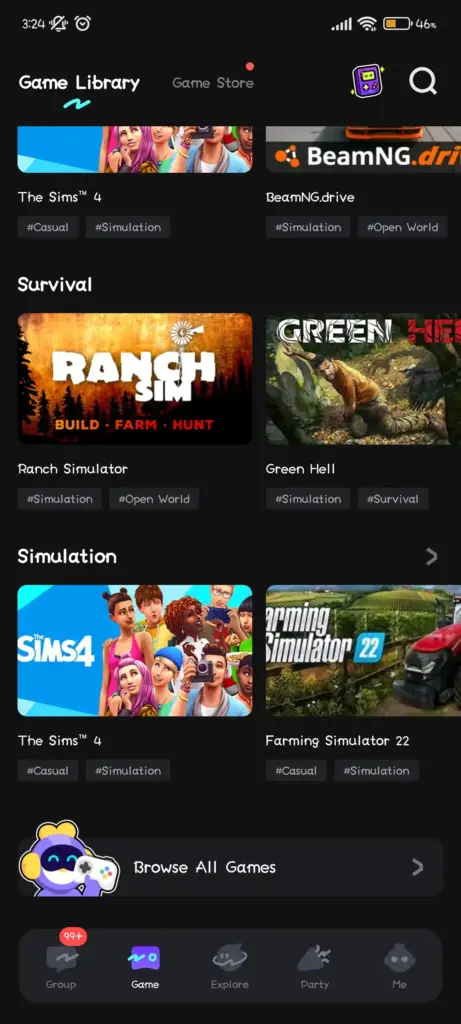
ಹಂತ 6 - "ಎಲ್ಲಾ ಆಟಗಳನ್ನು ಬ್ರೌಸ್ ಮಾಡಿ" ಕ್ಲಿಕ್ ಮಾಡಿ
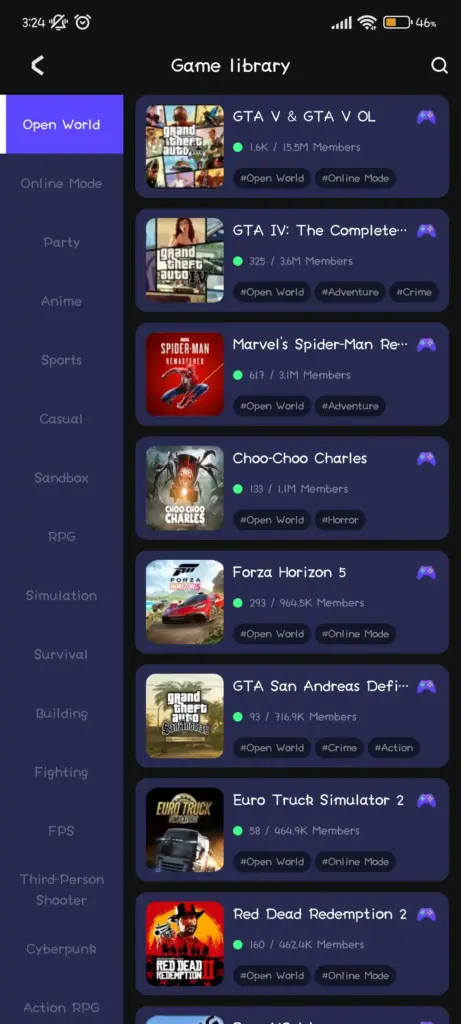
ಹಂತ 7 - ಮೂಲೆಯಲ್ಲಿರುವ ಹುಡುಕಾಟ ಐಕಾನ್ ಅನ್ನು ಕ್ಲಿಕ್ ಮಾಡಿ ಮತ್ತು ಕಾಲ್ ಆಫ್ ಡ್ಯೂಟಿ ಬರೆಯಿರಿ: ಬ್ಲ್ಯಾಕ್ ಓಪ್ಸ್ ಶೀತಲ ಸಮರದ ಸೋಮಾರಿಗಳನ್ನು ನೀವು ತೆರೆಯಲು ಆಟವು ಪಾಪ್ ಅಪ್ ಆಗುತ್ತದೆ.
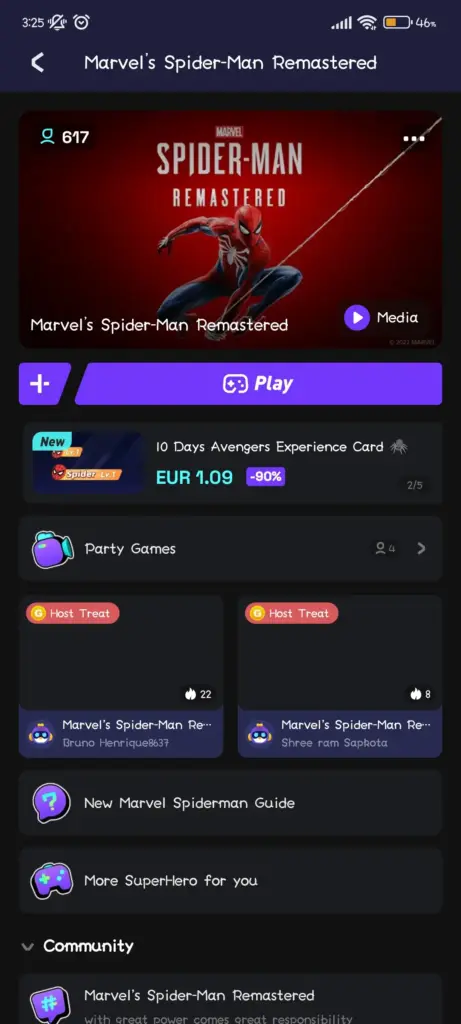
ಹಂತ 8 - "ಪ್ಲೇ" ಬಟನ್ ಕ್ಲಿಕ್ ಮಾಡಿ.
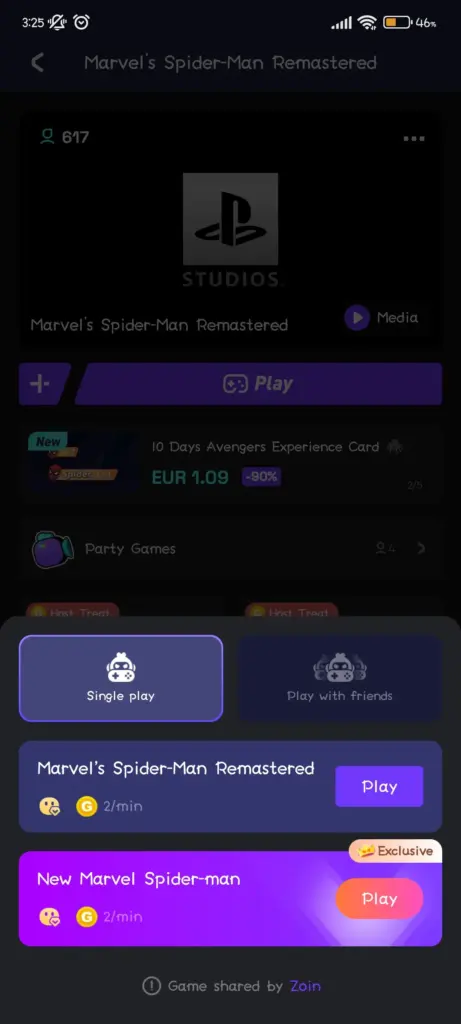
ಹಂತ 9 - ನೀವು ಆಟದ ಆವೃತ್ತಿಯನ್ನು ನೋಡುತ್ತೀರಿ, ನಿಮಗೆ ಬೇಕಾದುದನ್ನು ಆಯ್ಕೆ ಮಾಡಿ!
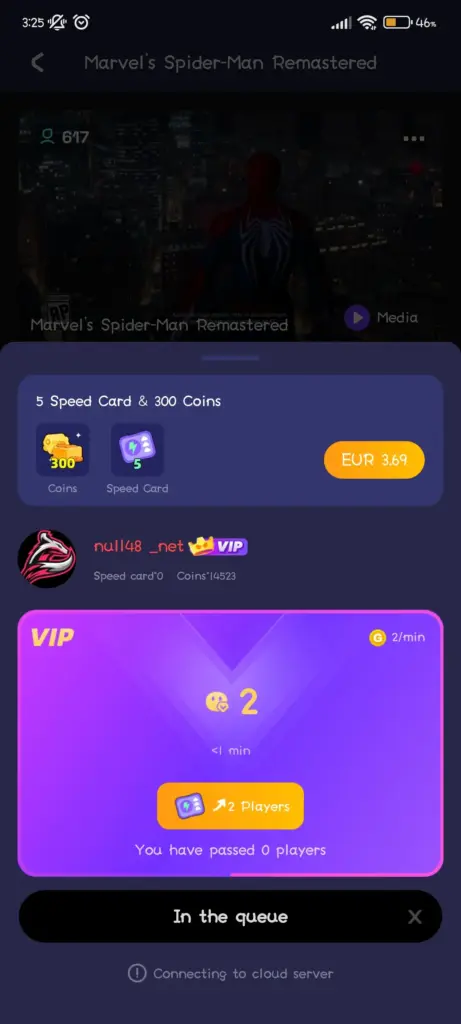
ಹಂತ 10 - ನೀವು ವಿಐಪಿ ಸದಸ್ಯತ್ವವನ್ನು ಖರೀದಿಸಿದರೆ, ಬಹುಶಃ ನೀವು ಕಾಯುವುದಿಲ್ಲ, ಮತ್ತು ಕಾಲ್ ಆಫ್ ಡ್ಯೂಟಿ: ಬ್ಲ್ಯಾಕ್ ಓಪ್ಸ್ ಶೀತಲ ಸಮರದ ಸೋಮಾರಿಗಳನ್ನು ಆಡಲು ಪ್ರಾರಂಭಿಸಲು ಸಿದ್ಧವಾಗಿದೆ. “ನೀವು ವಿಐಪಿ ಸದಸ್ಯತ್ವವನ್ನು ಖರೀದಿಸದಿದ್ದರೆ, ಕಾಲ್ ಆಫ್ ಡ್ಯೂಟಿ ಮೊದಲು ನೀವು ಸ್ವಲ್ಪ ಸಮಯ ಕಾಯುತ್ತೀರಿ: ಬ್ಲ್ಯಾಕ್ ಓಪ್ಸ್ ಶೀತಲ ಸಮರದ ಸೋಮಾರಿಗಳು ಅದನ್ನು ಆಡಲು ಸಿದ್ಧವಾಗಿದೆ.
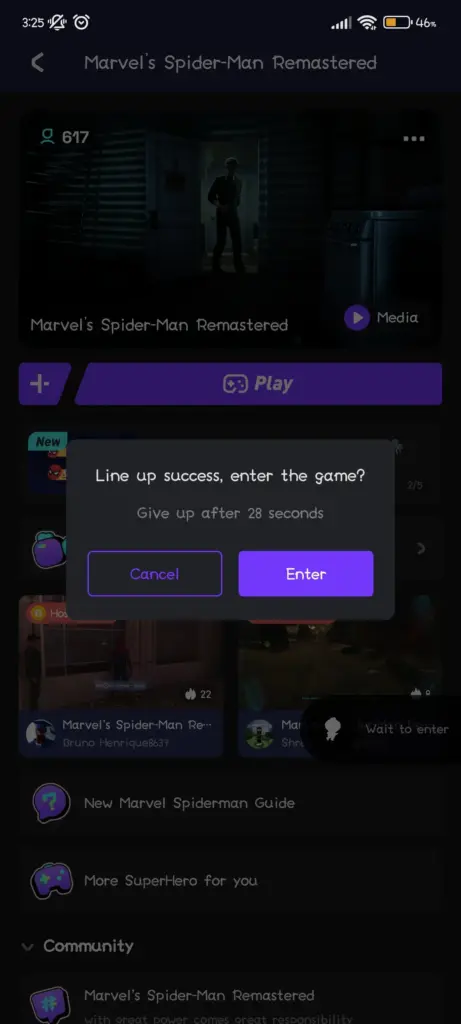
ಹಂತ 11 - "ಲೈನ್ ಅಪ್ ಯಶಸ್ಸು, ಆಟವನ್ನು ನಮೂದಿಸಿ" ಎಂಬ ಪಾಪ್-ಅಪ್ ಅನ್ನು ನೀವು ಪಡೆಯುತ್ತೀರಿ, "ನಮೂದಿಸಿ" ಕ್ಲಿಕ್ ಮಾಡಿ ಮತ್ತು ಅಷ್ಟೇ, ಕಾಲ್ ಆಫ್ ಡ್ಯೂಟಿ: ಬ್ಲ್ಯಾಕ್ ಓಪ್ಸ್ ಶೀತಲ ಸಮರದ ಸೋಮಾರಿಗಳನ್ನು ಆಡುವುದನ್ನು ಆನಂದಿಸಿ.
ಮತ್ತು ಈಗ, ನಾವು ಕೊನೆಯಲ್ಲಿ, ನನಗೆ ಕೆಲವು ವಿನಂತಿಗಳಿವೆ, ಸಾಮಾಜಿಕ ಮಾಧ್ಯಮದಲ್ಲಿ ನನ್ನನ್ನು ಅನುಸರಿಸಲು ನಾನು ನಿಮ್ಮನ್ನು ಕೇಳಲು ಬಯಸುತ್ತೇನೆ ಮತ್ತು ಸಹಜವಾಗಿ, ನನ್ನ YouTube ಚಾನಲ್ ಅನ್ನು ಪರಿಶೀಲಿಸಿ ನನ್ನಲ್ಲಿ ಆಟಗಳು ಮತ್ತು ಅಪ್ಲಿಕೇಶನ್ಗಳಿಗಾಗಿ ಅದ್ಭುತ ವೀಡಿಯೊಗಳಿವೆ ಮತ್ತು ಇನ್ನೊಂದು ವಿಷಯವೆಂದರೆ, ಇದು ನಿಮಗಾಗಿ, Chikii ಕ್ಲೌಡ್ ಗೇಮಿಂಗ್ ಅಪ್ಲಿಕೇಶನ್ಗೆ ಬಲವಾದ WIFI ಅಗತ್ಯವಿದೆ, ಆದ್ದರಿಂದ ನಿಮ್ಮ ಕುಟುಂಬವು ನಿಮ್ಮೊಂದಿಗೆ ಅದೇ ಇಂಟರ್ನೆಟ್ನಲ್ಲಿ ಬಳಸುತ್ತಿದ್ದರೆ ನಾನು ನಿಮಗೆ ಗೇಮಿಂಗ್ ಅಥವಾ ಬಲವಾದ WIFI ರೂಟರ್ ಅನ್ನು ಮಾತ್ರ ಶಿಫಾರಸು ಮಾಡುತ್ತೇನೆ, ಇಲ್ಲಿ Amazon #AD ನಲ್ಲಿ ಲಭ್ಯವಿರುವ ಕೆಲವು ಅತ್ಯುತ್ತಮ WIFI ರೂಟರ್ , ಮತ್ತು ಈ ವರ್ಗದ ಎಲ್ಲಾ Chikii ಆಟಗಳು , ಮತ್ತು ಇದು Chikii Red Dead Redemption 2 ನಲ್ಲಿ ಲಭ್ಯವಿರುವ ಅತ್ಯುತ್ತಮ 3 ಆಟಗಳಾಗಿವೆ Android ಗಾಗಿ ಡೌನ್ಲೋಡ್ - Chikii Cloud Gaming APP , Elden Ring Android ಡೌನ್ಲೋಡ್ - Chikii ಅಪ್ಲಿಕೇಶನ್ Cloud Gaming , MotoGP 21 Android ಡೌನ್ಲೋಡ್ ಆಟ - Chikii ಅಪ್ಲಿಕೇಶನ್ Cloud Gaming , ಮತ್ತು ಅಷ್ಟೇ, ಎಲ್ಲರಿಗೂ ಧನ್ಯವಾದಗಳು, ಮತ್ತೆ ಹಿಂತಿರುಗಿ ನನ್ನನ್ನು ಮಿಸ್ ಮಾಡಿಕೊಳ್ಳಬೇಡಿ, ಶಾಂತಿ.




